OCR Agent
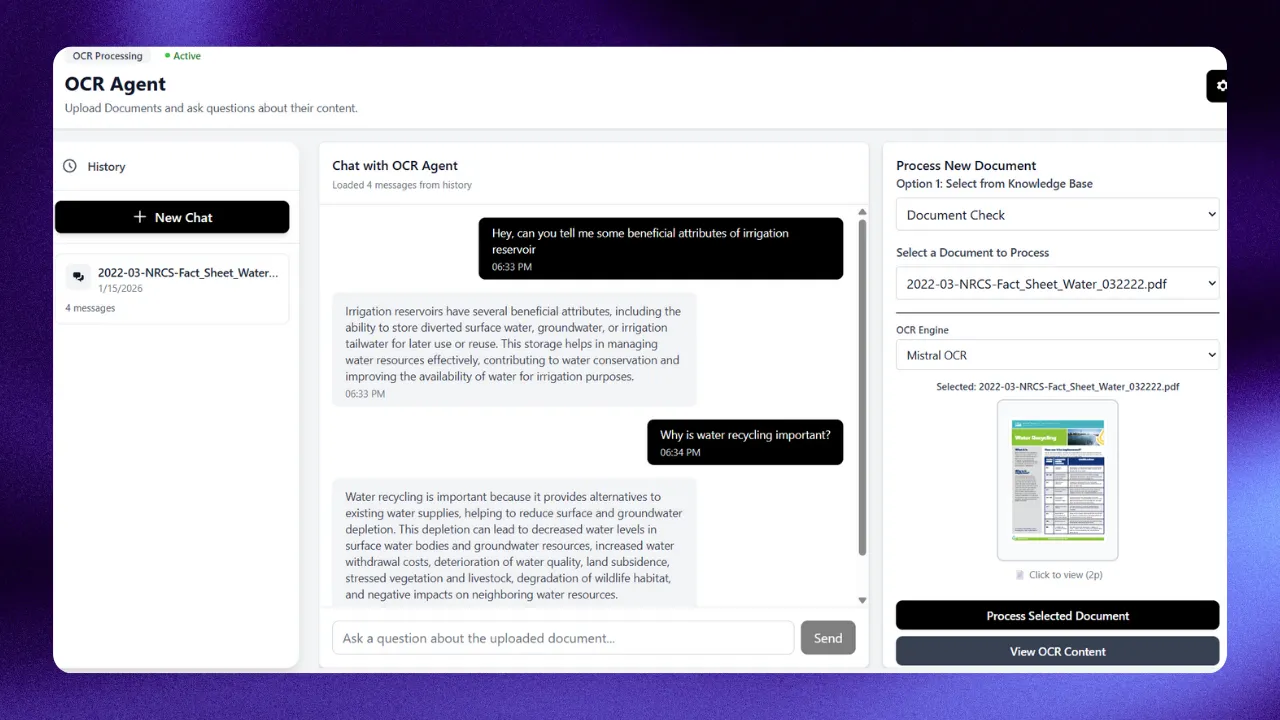
The OCR Agent provides intelligent document processing and question-answering capabilities for PDF documents. It uses advanced OCR technology to extract text and tables, and enables intelligent question-answering about your documents.
Base URL
/api/agents/ocr_agent
Authentication
All endpoints require authentication. Sign up to the https://nextneural.superteams.ai to get your API key.
Endpoints
1. Health Check
Check if the OCR agent service is running.
Endpoint: GET /health
Authentication: None required
Response:
{
"status": "healthy",
"service": "ocr_agent"
}
2. Process PDF
Process a PDF document with OCR and store the extracted content in the database.
Endpoint: POST /process_pdf
Authentication: Required
Request Body:
{
"file_name": "example_document.pdf",
"document_id": 123
}
Query Parameters:
ocr_choice(optional) - OCR engine to useforce_reparse(optional, default: false) - Force re-parsing even if already processed
Request Example:
curl -X POST "https://nextneural-api.superteams.ai/api/agents/ocr_agent/process_pdf?force_reparse=false" \
-H "Authorization: Bearer YOUR_TOKEN" \
-H "Content-Type: application/json" \
-d '{
"file_name": "annual_report.pdf",
"document_id": 123
}'
Response (New Document):
{
"message": "PDF processed successfully.",
"pdf_id": 456,
"kb_document_id": 123,
"already_processed": false
}
Response (Already Processed):
{
"message": "Document already parsed",
"pdf_id": 456,
"kb_document_id": 123,
"already_processed": true,
"processed_at": "2025-01-14T10:30:00"
}
Notes:
- The
file_nameshould be the filename (not full path) of a file in the media directory - The
document_idmust belong to the authenticated user (ownership is verified) - If
force_reparse=true, existing OCR data will be deleted and re-processed
3. Ask Question (RAG)
Ask questions about processed documents using RAG-based question answering.
Endpoint: POST /ask_ocr
Authentication: Required
Request Body:
{
"question": "What was the revenue growth in 2024?",
"document_id": 123
}
Request Example:
curl -X POST "https://nextneural-api.superteams.ai/api/agents/ocr_agent/ask_ocr" \
-H "Authorization: Bearer YOUR_TOKEN" \
-H "Content-Type: application/json" \
-d '{
"question": "What was the revenue growth in 2024?",
"document_id": 123
}'
Response:
{
"answer": "According to the document, the revenue growth in 2024 was 15.3%, increasing from $10.2M in 2023 to $11.8M in 2024."
}
Notes:
- The document must be processed first using
/process_pdf - The
document_idis required for security validation - The system finds relevant content and generates contextual answers
4. Get OCR Content
Retrieve the full OCR content organized by pages for a specific document.
Endpoint: POST /get_ocr_content
Authentication: Required
Request Body:
{
"document_id": 123
}
Request Example:
curl -X POST "https://nextneural-api.superteams.ai/api/agents/ocr_agent/get_ocr_content" \
-H "Authorization: Bearer YOUR_TOKEN" \
-H "Content-Type: application/json" \
-d '{
"document_id": 123
}'
Response:
{
"document_id": 456,
"kb_document_id": 123,
"company_name": "Acme Corporation",
"report_year": 2024,
"total_pages": 25,
"pages": [
{
"page_number": 1,
"text_chunks": [
{
"text": "Annual Report 2024..."
}
],
"tables": []
},
{
"page_number": 2,
"text_chunks": [
{
"text": "Financial highlights..."
}
],
"tables": [
{
"text": "Revenue $11.8M, Profit $2.3M...",
"structure": "| Metric | 2023 | 2024 |\n|--------|------|------|...",
"raw_data": ["Revenue metric 2023 $10.2M", "Revenue metric 2024 $11.8M"]
}
]
}
]
}
Notes:
- Returns structured content organized by pages
- Tables include both structured format and natural language representations
Conversation Management
The OCR Agent supports multi-turn conversations with context retention.
5. Create Conversation
Create a new conversation session.
Endpoint: POST /conversations/create
Authentication: Required
Request Body:
{
"kb_document_id": 123,
"title": "Financial Analysis Q&A"
}
Response:
{
"id": 789,
"user_id": 1,
"doc_id": 456,
"kb_document_id": 123,
"title": "Financial Analysis Q&A",
"started_at": "2025-01-14T10:30:00",
"last_message_at": "2025-01-14T10:30:00"
}
6. Add Message to Conversation
Add a message (user or assistant) to an existing conversation.
Endpoint: POST /conversations/{conversation_id}/messages
Authentication: Required
Request Body:
{
"conversation_id": 789,
"role": "user",
"content": "What was the revenue?"
}
Response:
{
"id": 1001,
"conversation_id": 789,
"doc_id": 456,
"role": "user",
"content": "What was the revenue?",
"timestamp": "2025-01-14T10:31:00"
}
Notes:
rolemust be either "user" or "assistant"- The conversation must belong to the authenticated user
7. Get Conversation History
Retrieve all conversations for the authenticated user.
Endpoint: GET /conversations/history
Authentication: Required
Query Parameters:
limit(optional, default: 100) - Maximum number of conversations to return
Request Example:
curl -X GET "https://nextneural-api.superteams.ai/api/agents/ocr_agent/conversations/history?limit=50" \
-H "Authorization: Bearer YOUR_TOKEN"
Response:
[
{
"id": 789,
"fileName": "Acme Corporation 2024",
"analyzedAt": "2025-01-14T10:31:00",
"duration": "5 messages",
"documentId": 456,
"kbDocumentId": 123
},
{
"id": 788,
"fileName": "Q4 Report",
"analyzedAt": "2025-01-13T15:20:00",
"duration": "3 messages",
"documentId": 455,
"kbDocumentId": 122
}
]
8. Get Specific Conversation
Retrieve a specific conversation with all its messages.
Endpoint: GET /conversations/{conversation_id}
Authentication: Required
Request Example:
curl -X GET "https://nextneural-api.superteams.ai/api/agents/ocr_agent/conversations/789" \
-H "Authorization: Bearer YOUR_TOKEN"
Response:
{
"id": 789,
"user_id": 1,
"doc_id": 456,
"kb_document_id": 123,
"title": "Financial Analysis Q&A",
"started_at": "2025-01-14T10:30:00",
"last_message_at": "2025-01-14T10:35:00",
"document": {
"doc_id": 456,
"kb_document_id": 123,
"company_name": "Acme Corporation",
"report_year": 2024
},
"messages": [
{
"id": 1001,
"role": "user",
"content": "What was the revenue?",
"timestamp": "2025-01-14T10:31:00"
},
{
"id": 1002,
"role": "assistant",
"content": "The revenue in 2024 was $11.8M.",
"timestamp": "2025-01-14T10:31:15"
}
]
}
9. Delete Conversation
Delete a conversation and all its messages.
Endpoint: DELETE /conversations/{conversation_id}
Authentication: Required
Request Example:
curl -X DELETE "https://nextneural-api.superteams.ai/api/agents/ocr_agent/conversations/789" \
-H "Authorization: Bearer YOUR_TOKEN"
Response:
{
"success": true,
"message": "Conversation deleted successfully"
}
Error Responses
All endpoints may return the following error responses:
400 Bad Request:
{
"detail": "document_id is required for security validation"
}
403 Forbidden:
{
"detail": "Document does not belong to this user"
}
404 Not Found:
{
"detail": "Document not found in OCR database. Please process it first."
}
500 Internal Server Error:
{
"detail": "Error message describing the issue"
}
Workflow Example
# 1. Process a PDF document
curl -X POST "https://nextneural-api.superteams.ai/api/agents/ocr_agent/process_pdf" \
-H "Authorization: Bearer TOKEN" \
-H "Content-Type: application/json" \
-d '{"file_name": "report.pdf", "document_id": 123}'
# 2. Create a conversation
curl -X POST "https://nextneural-api.superteams.ai/api/agents/ocr_agent/conversations/create" \
-H "Authorization: Bearer TOKEN" \
-H "Content-Type: application/json" \
-d '{"kb_document_id": 123, "title": "Report Analysis"}'
# 3. Ask questions
curl -X POST "https://nextneural-api.superteams.ai/api/agents/ocr_agent/ask_ocr" \
-H "Authorization: Bearer TOKEN" \
-H "Content-Type: application/json" \
-d '{"question": "What are the key findings?", "document_id": 123}'
# 4. Get full OCR content if needed
curl -X POST "https://nextneural-api.superteams.ai/api/agents/ocr_agent/get_ocr_content" \
-H "Authorization: Bearer TOKEN" \
-H "Content-Type: application/json" \
-d '{"document_id": 123}'